How to Change the Default Search Providers in Microsoft Edge
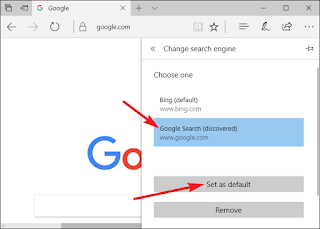
Bing is the default search provider of Microsoft Edge browser. When you search anything on Edge browser, it will search through Bing. Bing also powers many services like Cortana, Siri and Yahoo. But you are also able to change the default search engine of your Edge browser if you want. Follow the steps to change search provider in Microsoft Edge: Press the ‘Windows’ key of your keyboard or click the ‘Start’ button to open the start menu. Now, click on the search box and type ‘Edge’ into it. Press ‘Enter’ to start the search. Click on the ‘Microsoft Edge’ with a big white “e” written on blue background icon at the top of the result to open it. Visit the ‘Search Engine’ home page to add it to the list. For instance, if you want to use Google then type “google.com” into the search box of the Edge browser. Now, click on the ‘Three dots’ icon at the upper-right corner of the browser window. Click on ‘Settings’ from the dropdown menu to open basic browser settings. It is at...