Posts

How to Remove Windows 8 Account Image?
Image
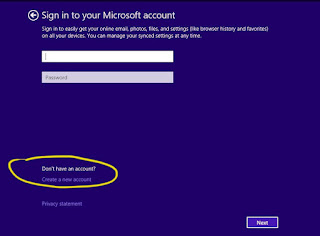
When you set up a new user account on Windows 8, a standard image is selected by default. You can change the image to something that is more personal. You can click a picture with the webcam or upload one from your PC. On the other hand, when you keep changing pictures often, they start piling in the User Account Settings screen. If you wish to remove your older user images, for whatever reasons, here are the steps to follow:  Windows 8  1. Relocate the mouse arrow to the upper right side of the desktop.  2. Alternatively, press the Windows key and hit the C key.  3. Allow the Charms bar to appear. You will be able to see it on the right corner.  4. Now, click on the Gear icon named Settings. It will be at the bottom most corner.  5. At the end of the Settings menu, you will find Change PC settings. Select it.  6. Now, in the PC settings screen, select Accounts from the left ...

Increase Your Website’s Speed: Best Tips

The customers can be lost or won literally in seconds. The researchers’ result has revealed that a 1 second postponement in page load time has a capability that can yield 11 percent fewer page views, a 16 percent decline in the customer satisfaction, and 7 percent loss in conversion. This point has been proved by Amazon also, by reporting enhanced profits of 1percent for every 100 milliseconds upgrading to their site speed. Many more examples could be mentioned, but the point is optimistically comprehensible that web page load time is money, straightforward and simple. As a result of competition increasing incessantly in the arena of the internet world, businesses and individuals today are supposed to be focused on doing everything in their power that can decrease their web page load time. If you want to increase your website’s speed, read ahead and follow some simple instructions given below. IMAGE OPTIMIZATION Research has revealed that the most customers tend to dump a websi...

Steps to Control Amazon Echo Using Your Phone

We cannot praise Amazon’s Echo devices enough. They are capable of taking on multitudes of tasks, whether reading you eBooks over Kindle, playing music on demand, updating you on the weather and traffic, and so much more! Alexa, the digital assistant, who is literally the voice of Echo devices, can be triggered just by a single command even by the most soft-spoken person. What’s even more amazing is that you can easily integrate your mobile phone with these devices to remotely control them. Amazon’s Echo device forms the heart of the networks constituting your smart home. If you wish to hook up your phone to any Amazon Echo device then you have come to the right place! How to Control Alexa from iOS devices Download and install the Amazon shopping app on your iOS device. Launch the app and sign into your Amazon account. Locate the microphone icon on the top-right corner of the app. After you have initialized and set up Alexa, the microphone icon will be replaced by a speech bal...

How to Recover Disabled Facebook Account

Facebook is a global social media network which has made its agreements and policies strict, especially for fake user accounts. As a user, if you send too many friend requests, the company can temporarily delete your account, or in other words, it can temporarily disable it. When you login to the account the next time, Facebook will show an “Account Disabled” message. There are other reasons like violating the terms and conditions of the company by posting contravening items, contacting people for commercial purposes, etc. If your Facebook account is disabled temporarily, then there are certain methods through which you can quickly regain your disabled account. Let’s check the procedure to recover the disabled Facebook account. How to recover a disabled Facebook Account Go to the Facebook homepage. Enter your  login credentials  and click  Login . If your account is accessible, then you will be prompted to either  Cancel   Deletion  or  Confirm...

How to Snap Out of Snapchat

Do you wish to take a permanent break from the world of “snapping?”Snapchat is one of the most popular social networking apps, especially amongst the teens. One of its unique features is that messages, videos, and images show up for a brief while and then disappear forever. Now, there may be many reasons why you might wish to delete your account from Snapchat. Just like you can delete conversations in Snapchat, you can permanently delete your account too.  If you are sick and tired of Snapchat, especially after its update, then you might just want to get rid of your Snapchat account. If you do not know how to do it, then here are the steps for deleting your Snapchat account permanently.  1. Power on your computer or phone or tablet (any web-enabled device shall do).  2. Launch any internet browser of your choice.  3. Look up the Snapchat Support website.  4. Go to the Delete Account webpage from the Snapchat Support...

How to Log Out of Amazon Kindle App

If you use the Kindle application on your iOS or Android device, then you may have noticed that there is no direct way to log out of it. If you wish to log out from your account but do not wish to uninstall it, then you can deregister tour account from the iOS or Android device. After deregistering it, your account will get removed from the app and you will not be able to access the contents anymore. If you wish to switch to another Amazon account, then you can simply deregister first and after that register again. Moreover, if your device gets stolen, then you deregister your account from that device for security purposes. Also, if you are going to give away or sell your device, then it wise to remove your account from the Kindle app.  Here is how you can sign out of Amazon applications: Deregister Kindle account on iOS device Unlock your iOS device and go through the applications. Find Kindle application and tap on it. If you have way too many apps on your device, then it...

How to Log Into Multiple Gmail Accounts

Gone are the days when every individual had a single email account. On an average, every internet user has at least three email accounts for various purposes. Be it work, academic, personal, or even spam accounts for registration at multiple websites, there is a different account linked to each of these activities. And why should one feel shy about creating many accounts? Anyone can sign up on Gmail for free! However, the flipside to this situation is that you need to keep track of these accounts. This includes remembering all the passwords, checking the mails you receive in each of these inboxes, and logging in and logging out of these accounts depending on your need. Thankfully, Google has made it fairly simple to switch from one account to another, whether you are on your phone or desktop. If you wish to log into multiple Gmail accounts, follow the steps given below: Accessing Multiple Gmail Accounts on Your Computer Open the Google homepage on your browser. If you are logg...